The quality of the paper depends on the writer. That is self-evident. We dont hire hacks and that is why we manage to impress our clients with well-written, deeply-researched and argumentative papers. After your writer finishes work on your project, our editors review it to assure it has appropriate style, structure and contains no mistakes. We also check your paper for plagiarism before you receive it on your email. The final result you have is a plagiarism-free, original, quality work.
Development Server
Diva comes with a couple of simple shortcuts for running your application using the WSGIServer from the Python standalone library.
Assuming you have an Application subclass (see ApplicationObject), for example:
>>> from diva.core import Application
>>> class MyApp(Application):
...     pass
You can then run that application using the development server as follows, directly from the Python shell:
>>> import logging
>>> from diva.server import serve
>>> serve(MyApp(), log_level=logging.DEBUG)
[INFO] diva.server: Serving <__main__.MyApp object at 0x10f63f0> on 127.0.0.1:8080
Command-Line Interface
It's also simple to enable your application to be run from the command-line, as shown in the following script:
import os
from diva.core import Application
from diva.server import main

class MyApp(Application):
    pass

if __name__ == '__main__':
    main(MyApp())
Now running that script will automatically launch a simple command-line interface complete with options:
$ python myapp.py --help
Usage: myapp.py [options]

Options:
  -h, --help            show this help message and exit
  -O name=value         set a configuration option
  -r, --auto-reload     automatically restart after code changes (default off)

  Network:
    -b HOST, --host=HOST
                        hostname or IP address to bind to (default 127.0.0.1)
    -p PORT, --port=PORT
                        port number to listen to (default 8080)
    -z, --zeroconf      advertise server over zeroconf (Bonjour or Avahi)

  Authentication:
    -B FILE, --basic=FILE
                        path to an unencrypted password file to use for basic
                        authentication
    -D FILE, --digest=FILE
                        path to a htdigest file to use for authentication
    --realm=REALM       name of the authentication realm (default "MyApp")
    --protect=PATH      path(s) to protect by authentication

  Logging:
    -v, --verbose       print as much as possible
    -q, --quiet         print as little as possible
You can use the -O option to set one or more configuration options, overriding any defaults set by the application. For example:
$ python myapp.py -Odebug=false -Ocsrf_protection=false
See ConfigOptions for a list of options made available by the framework, in addition to any custom options your application may support.
Logging
The development server automatically sets up logging for you, with log messages being written to stderr (so they should just show up on the console where you started the server). The verbosity level of the log messages can be controlled with the command-line options --verbose/-v (for debug-level logging) and --quiet/-q (for error-level logging). The default is info-level logging.
If you're on Python 2.6 or later, and/or have the simplejson module installed, the development server also automatically enables FirePHP support for directing request-related log messages to the Firebug console in the browser.
Automatic Reloading
When the command-line interface is used, automatic restarting of the server can be enabled using the --auto-reload (or -r) option. This will cause the framework to look for changes to any loaded Python modules, as well as a couple of other files such as routing configuration files and translation catalogs. Whenever a change is detected the complete server process is restarted. Note that this will sometimes cause a short delay until the server is available again.
Applications can add their own files to the list of watched files using the watch_file() function.
Authentication
The development server can inject a WSGI middleware component that performs HTTP authentication (either Basic or Digest) against a specified password file. This is intended primarily for developing and testing authorization-sensitive parts of your application. In particular, this middleware is not intended to be used on production systems where security is critical.
The --digest option is used to specify the text file containing the credentials for digest authentication, in a format compatible with the Apache htdigest tool. The --basic option allows you to use an unencrypted password file for even simpler setup. The --realm option can be used to specify a different realm, where the default is the name of the Application class. This realm needs to match the realm used in the digest file.
The format of the password file for Basic authentication is simple: one line per account, containing the username and the password (in the clear) separated by a colon. Note that this format is not compatible with the format generated by the htpasswd tool, which encrypts the passwords.
Finally, the --protect option can be used to require authentication only on the specified sub-resources. When the --protect option is not provided, the whole URI space will require authentication. When it is specified, authentication is only required on the specified paths. To protect more than one path, simply specifiy the option as often as you need.
For example:
$ ./myapp.py -rv --digest auth.digest --protect /login
Zeroconf Support

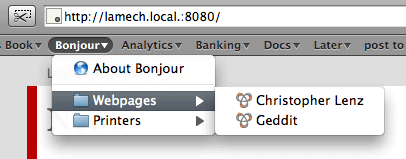
The server can optionally register as a service with Bonjour or Avahi, allowing easy lookup of the server from any machines on the local network that have Zeroconf support.
This requires the pybonjour package to be installed, which in turn requires the ctypes package for Python versions older than 2.5. On Mac OS X, the Zeroconf support works out of the box after a simple easy_install pybonjour incantation. On Linux, you'll need to install Bonjour, or (more commonly) Avahi and the libavahi-compat-libdnssd1 library. On Windows, download and install the Bonjour package Apple provides for Windows.
When the prerequisites are in place, Zeroconf support in the Diva development server is enabled using the -z or --zeroconf command-line option.
API Documentation
Attachments (1)
-
zeroconf.png
(10.8 KB) -
added by cmlenz 16 years ago.
Bonjour screenshot
Download all attachments as: .zip